


Taking Screenshots: Three Tricks for the Mac and One for iOS
They say that a picture is worth a thousand words, but the screenshot that captures a confusing error message or funny auto-correct fail is far more valuable. Pop over to our site and we’ll explain how to capture screenshots on your iPad or iPhone, and three different ways you can take screenshots on your Mac.

Change Camera Modes Easily on an iOS Device
The Camera app on the iPad, iPhone, and iPod touch can take three kinds of video and three types of photos, and the interface suggests that you switch between them by tapping or swiping on the labels below the viewfinder. Unfortunately, those labels are small and can...
Make Phone Calls Directly from iOS Calendar Events
Let’s say you’re setting up a lunch with a contractor, and you want to make it easy to call them when your iPhone alerts you to the meeting. Or perhaps you want to embed conference call details into an event. A little-known fact about the Calendar app is that you can...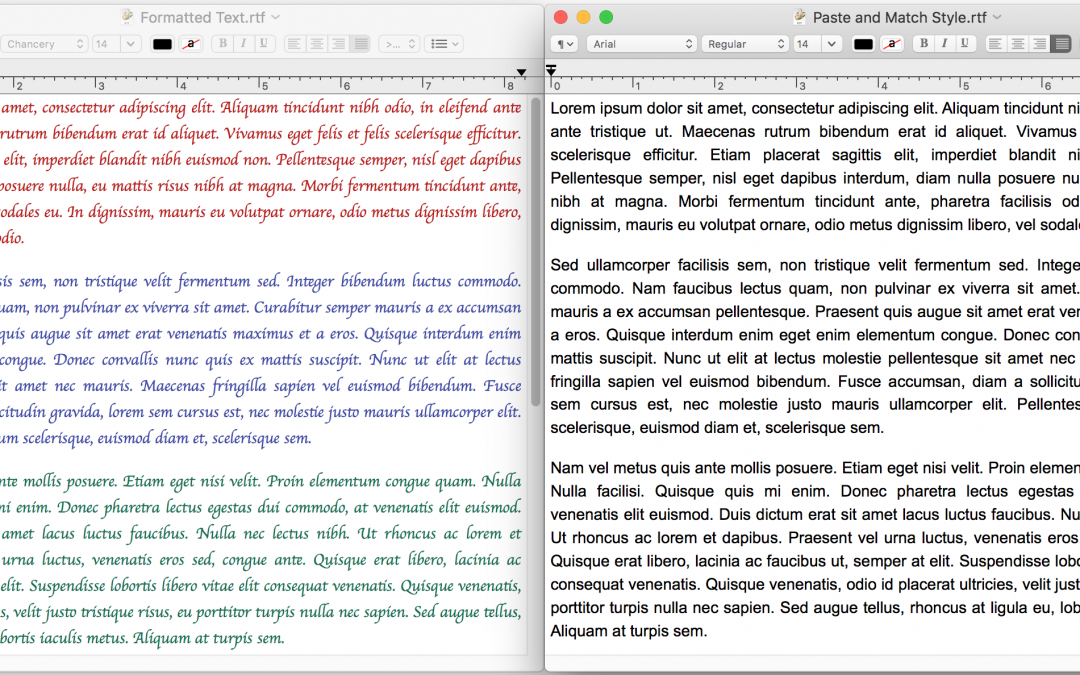
Paste without Formatting on the Mac
When you copy text from a Web page, PDF, or word processing document, OS X usually includes formatting, so the words you paste may be 56 point blue italic if that was what the source text looked like. That may be appropriate at times, but often you want the text to...
PSA: Add a Medical ID to Your iPhone for Emergencies
Did you know that an iPhone can store medical information that could save your life, or help you save someone else’s? Learn how to create your Medical ID on our blog, and be sure to teach family, friends, and colleagues how to access this information in case of emergency too!